
Visual AI Flow Builder
Build complex AI-powered conversation flows with 38+ node types and vector embeddings.
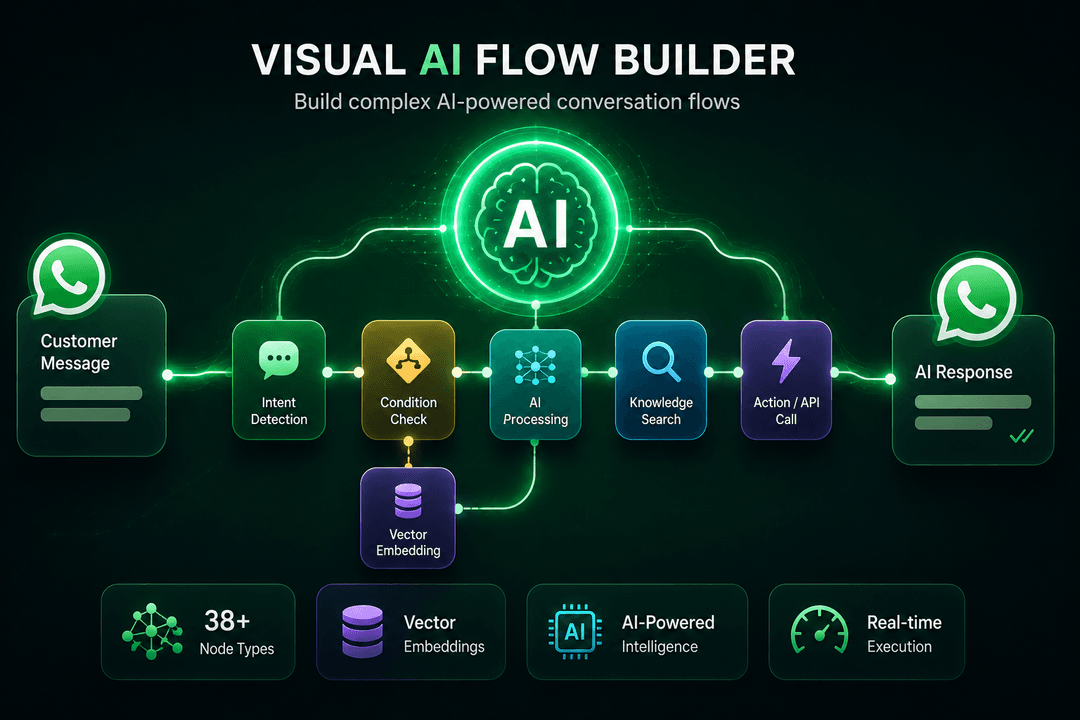
Create Intelligent Conversations Without Code
Our Flowmaker is the most powerful visual AI flow builder in the WhatsApp ecosystem. With 38+ node types across 7 categories, you can build anything from simple FAQ bots to complex multi-step conversational AI that understands context, retrieves knowledge, and makes decisions.
Upload training documents (PDF, DOCX, TXT, websites, FAQs) and our system creates vector embeddings for semantic search. The AI uses this knowledge base to answer questions accurately, even when phrased differently. Set up delays, conditional branches, Commerce payment nodes, and follow-up sequences.
How It Works:
- Upload Knowledge: Add PDFs, websites, FAQs, or plain text documents to train your AI.
- Vector Embeddings: System processes documents into searchable vector embeddings for semantic understanding.
- Build Flow: Drag-and-drop nodes to create conversation logic with conditions, delays, and API calls.
- Deploy & Monitor: Activate your flow and track execution stats in real-time from the dashboard.
Node Categories:
- Input Nodes: Text, AI prompt, conditions, delays, variables.
- Output Nodes: Send text, media, buttons, lists, templates.
- Commerce Nodes: Payment links, subscription management, order tracking.
- Integration Nodes: API calls, webhooks, external service connectors.
- AI Nodes: OpenRouter integration with 300+ models, prompt templates.
- Flow Control: Branches, loops, sub-flows, error handling.
- Knowledge Nodes: Vector search, document retrieval, context injection.
Key Benefits:
- 38+ Node Types: Text, AI prompt, conditions, delays, API calls, Commerce payments, and more.
- Document Training: Upload PDFs, websites, FAQs to train your AI chatbot.
- Vector Embeddings: Semantic search for accurate, context-aware responses.
- Execution Tracking: Monitor every flow execution with detailed analytics.
- OpenRouter Integration: Access 300+ AI models including GPT-4, Claude, Llama, and more.
- Per-Tenant API Keys: Each company uses their own OpenRouter key for complete control.
Use Cases:
- Customer support automation with knowledge base retrieval
- Lead qualification and CRM integration flows
- Order status tracking and payment collection
- Appointment booking and reminder sequences
- Multi-language support with AI translation
Ready to Use This Feature?
Our experts are here to show you how Visual AI Flow Builder can transform your business communication.
Request a Consultation